
Screenshot Adobe Photoshop Touch for tablet

If you include tablet users who too often use popular photo editing software, Photoshop, now you can enjoy it directly on your tablet. Unlike Adobe Photoshop Express is also available for iPhone and Android phones, Adobe Photoshop Touch is made exclusively for tablet devices.

Editing option is available even closer than the desktop version of Adobe Photoshop Express. You could use a popular feature in Photoshop such as layers, selection tools, adjustments, and filters.
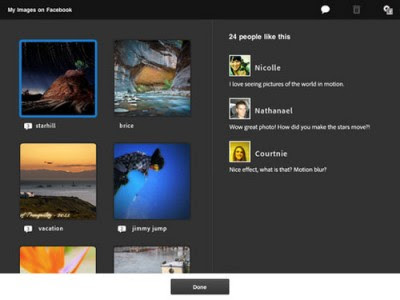

Screenshot Adobe Photoshop Touch for tablet


Screenshot Adobe Photoshop Touch for tablet 1


Screenshot Adobe Photoshop Touch for tablet 2


Screenshot Adobe Photoshop Touch for tablet 3


Screenshot Adobe Photoshop Touch for tablet 4


Screenshot Adobe Photoshop Touch for tablet 5


This application also allows you to use the high-resolution images with support for up to 12MP resolution. For beginners, there is a tutorial that will hone your photo skills manupulasi.

Developer: Adobe; Device: iPad 2 or later; tablet Android; Minimum Requirements: iOS 5.0 or later; Android 3.1 and up; Download: AppStore and the Android Market; Price: $ 9.99 (AppStore and the Android Market); File Size: 56.3 MB (iPad), 46MB (Android Tablet)

Popular posts from this blog

Asus Introduce Padfone Infinity, Genre New Asus Padfone

Asus Padfone Infi nity has a 5-inch screen with a resolution of 441ppi screen 1080piksel and density . Not much different from the previous Padfone , Padfone Infinity is also bundled with the tablet dock dimensions 10.1 inches with a resolution of 1920x1200 pixels . Interestingly , the screen and the dock Padfone tablet was immersed anti-fingerprint coating . uses Qualcomm Snapdragon chipset 600, infinity Padfone comes with quad -core CPU with a clock speed of 300 Krait to 1.7GHz . Infinity has a unibody design made ​​of aero -space grade aluminum alloy. Using a battery capacity of 2400 mAh , the device is claimed to be able to make calls 3G up to 19 hours , 6.5 hours of web browsing , 9 hours of watching video or up to 410 hours of standby time . While the tablet dock pinning capacity 5000mAh battery which can provide standby time 3 times . On the connectivity , there 100Mbps LTE ( Cat 3) and NFC ( ...

Screenshot Benchmark Results Samsung Galaxy S IV

Benchmark results predicted owned most awaited smartphone , Galaxy S IV , pushed recently . As shown in the figure , the Galaxy S IV seen perched at the top , beating the LG Optimus M and the Nexus 4. Well , other than to look at benchmarks , some specifications mainstay of frontrunner Samsung was also re- exposed . As reported Androidiani , Galaxy S IV are called will have a screen size of 4.99 -inch Full HD , 2 GB RAM , 5 Octa Exynos processor , PowerVR SGX 544 MP GPU , 13 -megapixel main camera , secondary 2.1 megapixel camera , Wi - Fi , Bluetooth 4.0, and NFC . Galaxy S IV also written will run Android 4.2 Jelly Bean as the operating system . Screenshot Benchmark Results Samsung Galaxy S IV Based on the latest information circulating last week , it was mentioned that the Galaxy S will be launched Samsung IV on March 14 . South Korean vendors will also come packed launch eve...

Unique features of LG Optimus L9

LG Optimus L9 have three exciting features with different functions , each of which is Quick Translator, My Style Keyboard and QMemo . These Tips by Phone , LG Optimus L9 to use 3 features. Quick Translator Feature or exactly one application is presented to allow users to translate the writing in a foreign language into another language that is understandable user. Quick Translator can recognize up to 44 languages ​​and can be translated into 64 languages ​​user. How to use this application was quite sophisticated but still simple . Users simply point the camera lens to the article you want translated . Previously users had to know which language is used in writing to translate and then select it from the list of languages ​​on the left side of the screen . My Style Keyboard This one is a feature that essentially wants to give comfort to the user L9 in typing . With this feature users can menyeseuaika...